D90 vs D70: The Body and Controls

The Nikon D70 was one of the first dSLRs targeted at the amateur photography market. It ran rings around it’s older brother, the D100. After the introduction of the D70s, D60, D50, D40, D80, D200, D300, D2x, D2h, D3, and D700 comes the D90.

D70 meet your replacement. The D90 is slight shorter and includes a customizable function button below the autofocus assist lamp. The mic for recording video is over on the right. Nothing else to see here really. Think of the D90 as a mullet: business in the front, party in the back.
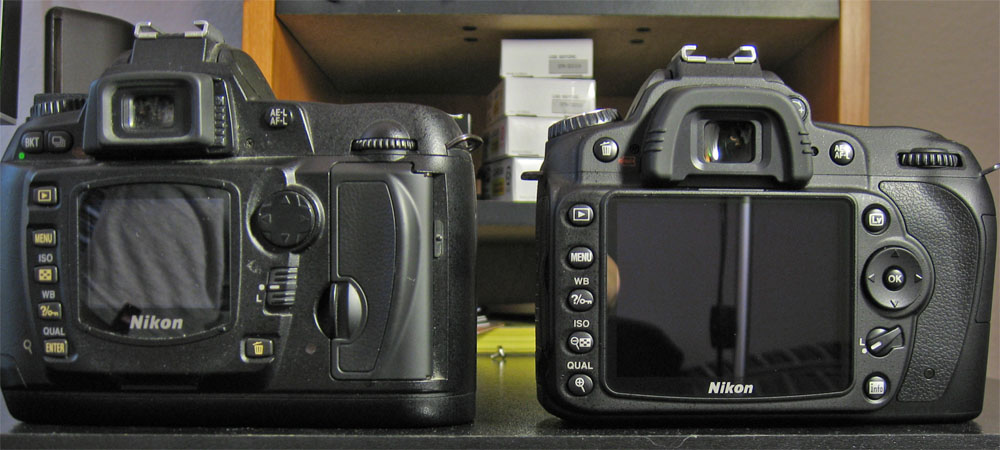
The D90’s 3 inch LCD simply dwarfs the D70’s diminutive 1.8 inch screen and boasts a much higher resolution. The D70’s bracketing button moved to the side under the flash button and shooting mode moved to the top panel. The delete button takes the spot in the top left and is replaced with a nifty INFO button that brings up the current settings on the LCD and gives quick access to some settings. The autofocus sensor selector lock is more compact and the 4 way directional pad gets an OK button (performs menu selections, resets autofocus sensor to the middle and starts recording video in Live view). The top panel now sports the exposure mode, exposure compensation, shooting mode and autofocus mode buttons.

The other big visible change is the viewfinder. Using my SD700’s macro mode I actually got a shot of each viewfinder to compare the size of each. The D90’s viewfinder is noticeably bigger. Like the LCD, bigger is better here.

Not readibly visible are a lot of interface changes inside the menus. It is now possible to save and name customized picture settings, store 5 preset white balances and setup a custom menu with all your frequently accessed items. All of that makes changing settings much easier. On the D70, I got things where I wanted 2 years ago and left all the settings alone because they were a pain to adjust and then remember what to switch them back to.

Some prelimanary shots and tests of the D90’s “Active-D lighting”, high ISO performance and built-in chromatic aberration correction up next. If you’re already sold, grab it from a reputable dealer like Amazon.

Say Hello to the D90

I mentioned a package showing up at my door on Friday and here it is:

My D70 has served me well for about 3.5 years, but we’re talking about 4.5 year old technology. There has been a lot of progress since the D70 was introduced, but the D80 wasn’t a big enough change to warrant an upgrade. That money was much better spent on the marvelous 18-200mm VR lens. The D90 is different though, it sports lots of features that have trickled down from the higher end Nikon cameras. The D90 uses the same sensor as the much more expensive D300 for example.

I knew I wanted to upgrade eventually, but I got a deal I just couldn’t pass up. The body normally sells for $1000, about the same as the D70 4 years ago, and discounts are generally hard to come by. You can wait a couple years for prices to drop, but then there’s something better out. I pulled the trigger on the camera once I figured out how to get it for $700.

30% discount? How’s that work? I have Microsoft to thank. They’ve launched a cashback program on their Live search engine. For some reason they are giving 20% cashback for anything bought after you click through an Ebay ad on their search results page. Auction just has to be Buy-it-now and paid through Paypal. Found a reputable photography shop in Pennsylvania selling the D90 body and in 2 months Microsoft will deposit $200 into my Paypal account. On top of that I had a 10% off coupon from Ebay that could be used on anything. Total discount = $300.

So what is my impression of the D90 so far? Wow. Talk about a huge upgrade. It should hopefully help me post more pictures because the results straight of the camera are much more solid. My D70 shots needed a good amount of processing which takes time which means most shots never got posted. Direct comparison between the D90 and D70 is coming.

New pictures up in gallery

Got some new pictures up in my image gallery: Turlock from earlier this year (The Blarg had high def video posted, I’ll stick to pics) and My Righteous Indignation’s graduation/hooding/party. Enjoy.

And just a side note on the pics. I processed the heck out of the Turlock pics in Photoshop with a painfully manual workflow. The graduation pics were processed with the Adobe Lightroom beta and are pretty much straight from the camera except for a little cropping and white balance adjustment. I’m going to be using Lightroom some more and write up my impressions. The one thing I’m really liking is non-destructive edits; no more exporting to TIFF so I don’t have to worry about saving JPEGs more than once.