New Nikon 35mm f/1.8 AF-S DX lens

Nikon just announced the AF-S DX NIKKOR 35mm f/1.8G this week. I promptly placed a preorder at Amazon.

If you own a D40/D40x/D60 then this little $200 lens should be on your list. Previously the 50mm f/1.8 was the only affordable way to get a fast prime from Nikon, but without the AF-S you don’t get autofocus on these cheaper cameras. Also, on the DX cameras, the 50mm becomes 75mm which is a bit long. The 35mm becomes a 52.5mm which is much closer to the traditional “normal” 50mm on a film camera.

This lens focuses closer than the 50mm (less than 1ft vs about 1.5ft) and should be noticeably wider. Looking forward to its release in March.

D90 vs D70: Image Quality and Pixel Peeping

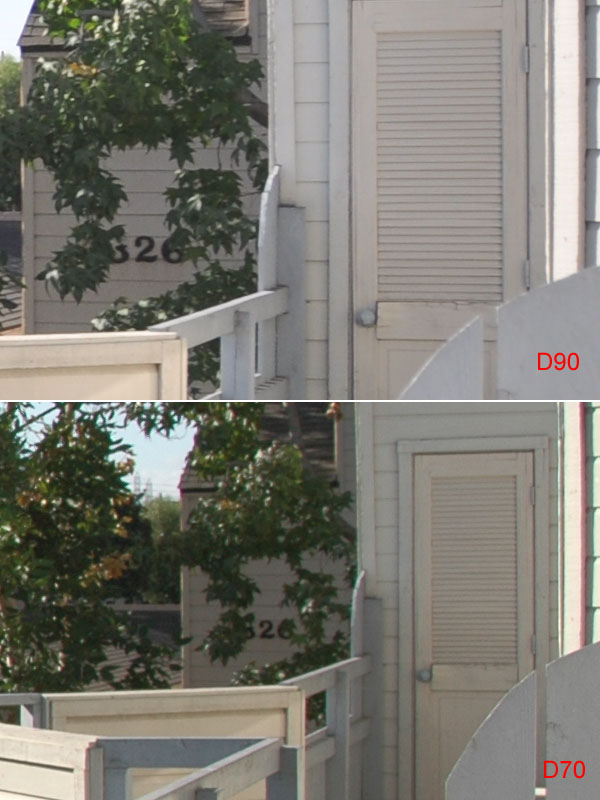
I typically don’t like pixel peeping and encourage myself to just go take pictures, but I wanted to see how my shooting might be affected by the D90 and if I need to change my post-processing. These shots were all done with AUTO WB in “Program’ mode with no post-processing. Click each comparison for a bigger image.

Quick shot of my home theater system in difficult light. The D90’s white balance is much better and the Active D Lighting brings up shadow detail on the front of the speakers without blowing out the window.

d90d70-1

Quick outside shot. Color on the D90 is just better overall. No idea what the D70 is doing with the sky.d90d70-2

Zooming in at 100% shows some more significant differences. The bigger sensor translates to more detail, but the D90 also includes built-in chromatic abberation correction. In the D70 image, chromatic abberation rears its ugly hard along the roof and on the very right side of the trim. The D90 corrects this with magic.d90d70-3

Another tough indoor shot. Active D Lighting brings out detail in the chair and the bricks on the left.d90d70-4

Wow 100% view of my checkbook! Testing a little low light/high ISO performance here and the difference is just night and day. When the D70 cranks up the ISO its color performance plummets. The D90’s performance here is incredible compared to what I’ve had to live with on the D70. Before I’d be wary of shooting at ISO 1600, now I wouldn’t think twice.d90d70-5

Last little comparison highlights low light performance again with the compact Canon SD700 thrown in for a sense of how different point and shoots and dSLRs are. The SD700 does a good job with white balance, but the noise at just ISO 800 is appalling. The D70 fails miserably on white balance here (indirect sunlight bouncing into the kitchen) and the level of chroma noise further degrades the image. The D90’s sensor handles chroma noise much better which results in a more useable picture.d90d70-6

Just putting the D90 in “Program” with AUTO ISO and AUTO WB (tweaked warmer with A3) results in much more useable shots. In fact, since switching to the D90 I haven’t had to process an image in Photoshop. Now I can import straight into Picasa, crop, make any other quick tweaks and export straight to the web or out for printing.

Amazon has a very competitive price on the D90, but if you order one somewhere else be sure to stay away from the shady Brooklyn photo dealers.

Macro Mystery #4

Been a little while since the last Macro Mystery so I thought I’d do a quick one with the D90. Like usual, don’t look at the comments if you don’t want the answer spoiled, but this one is easy. Click for full size:

dsc_0594

New Image Organization Strategy

I have just shy of 10,000 images archived and managing them is not an easy task. I decided to go with Picasa because of their software which turns out to be fantastic, I don’t think I had used it since version 1 or 2, and it is free. I doubt I’ll be hitting the 1GB any time soon and I’m uploading 1600×1200 which are good enough for 4×6’s if anyone wants to order prints.

My new photo organization strategy will let me move to a different host quickly if I outgrow Picasa. Previously I only had one folder called “Images” with a bunch of subfolders for different sets like “Andrew Birthday 2002”. For my new system I renamed my “Images” folder to “Image Archive” and created a new folder called “Image Gallery”. Here’s how my workflow is going to go now:

  1. Camera imports go straight into “Image Archive/_Import”
  2. Sort through and star favorites of the imports
  3. Copy favorites to a folder in “Image Gallery” for publishing
  4. Move imports to an appropriate folder in “Image Archive”
  5. Process images in the Image Gallery folder leaving original files alone in the Archive
  6. Image Gallery folders are then printed and/or posted to the web
  7. Run backup sync to external hard drive

Previously I was creating a “picks” subfolder inside each set’s subfolder and didn’t have an easy way to see the images I had printed or posted to the web. I was also resizing for the web before uploading so I’d sometimes have “web” folders under the “picks” folder. This will keep things nice and tidy.

I might refine my directory structure or naming scheme eventually, but having a completely seperate folder with my full size favorites ready for use will make getting things published a lot easier. The Archive will now strictly be an organized vault of the original images coming off the camera.

Other photo news, I sold the D70 for $340 and I’m just waiting for my $200 cashback from Microsoft at the end of the month. That brings my upgrade cost to $360 dollars, not too shabby.